Texture pack for Minecraft Bedrock
Aurelia Arcade
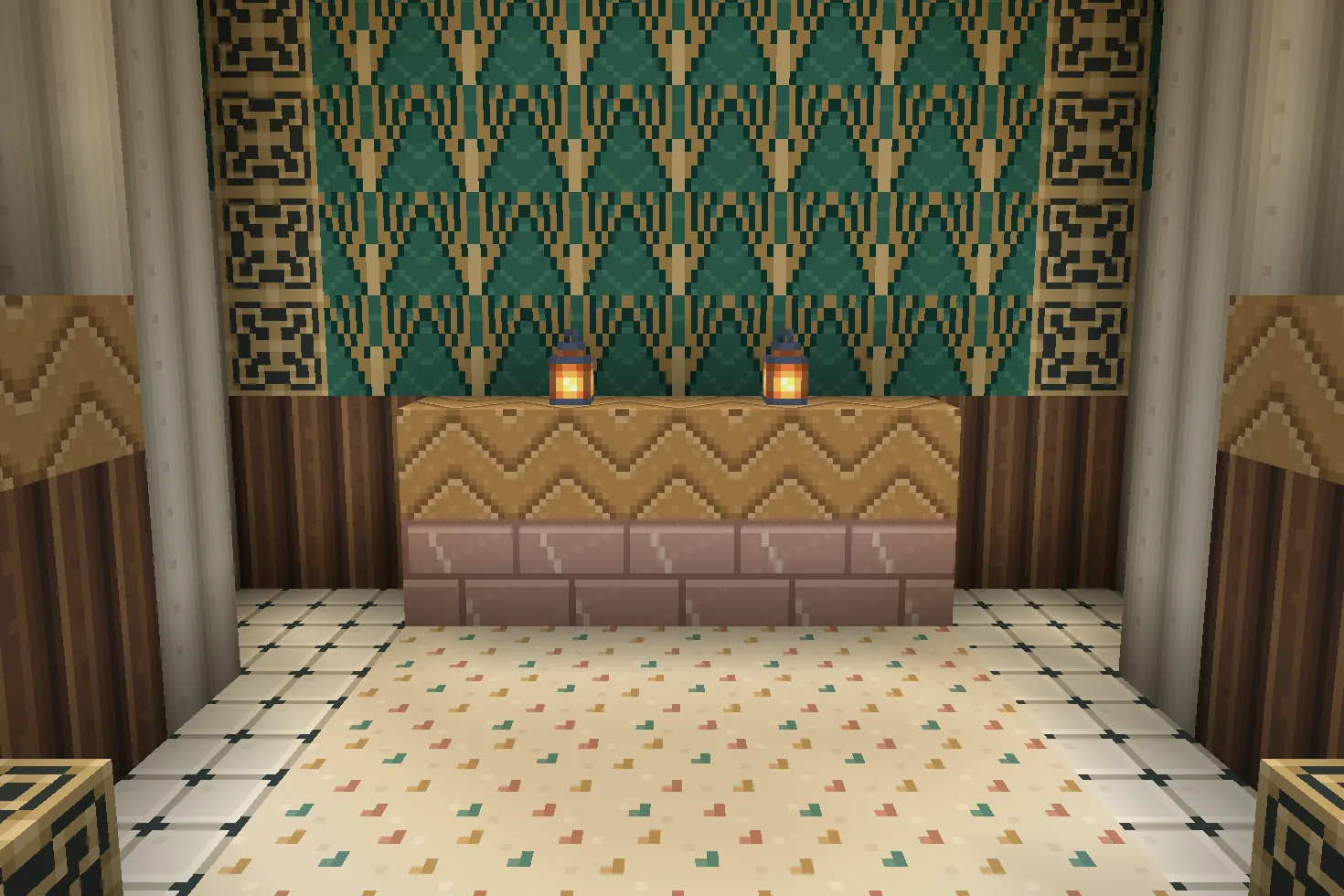
Nine Art Deco materials: ivory fluting, jade fans, gold chevrons, terrazzo, rose stone, ceramic diamonds, brass and two timbers.
Free. 5 kB.
Changes 9 blocks. Works with Minecraft Bedrock 1.21 and newer. No experimental features.
In the game
A build using this pack inside Minecraft on a phone, photographed when we checked it. The download includes the textures; the build is an example.
What changes
Give an arcade, hotel lobby or city apartment a coordinated Art Deco palette. White concrete becomes fluted ivory plaster; green concrete carries jade-and-gold fans; black concrete gains stepped gold chevrons. Yellow concrete becomes warm terrazzo, pink concrete becomes veined rose stone, and light grey concrete becomes ivory ceramic with charcoal diamond corners. Iron blocks carry opaque brass ornament, birch planks become honey chevron parquet, and dark oak planks become ribbed walnut. Nine original 16×16 tiles replace these existing texture files throughout the world, including blocks that share them. Fluting, inlays and brass recesses are painted details. No buildings, furniture, lighting effects or gameplay changes are included. Other textures keep their existing appearance.
White concrete
Every white concrete block in your world takes this look.
Green concrete
Every green concrete block in your world takes this look.
Black concrete
Every black concrete block in your world takes this look.
Yellow concrete
Every yellow concrete block in your world takes this look.
Pink concrete
Every pink concrete block in your world takes this look.
Light gray concrete
Every light gray concrete block in your world takes this look.
Block of iron
Every block of iron block in your world takes this look.
Birch planks
Every birch planks block in your world takes this look.
Dark oak planks
Every dark oak planks block in your world takes this look.
How to install
- Open the .mcpack file with Minecraft Bedrock to import it.
- Edit a world, open Resource Packs, find this pack under My Packs and activate it.
- Place it above other packs that replace the same textures.
- Frame walls with white concrete fluting and green concrete fan panels.
- Use black concrete for gold-chevron borders, pink concrete for rose-stone accents, and iron blocks for opaque brass ornament.
- Lay yellow concrete as terrazzo or light grey concrete as diamond-corner ceramic. Birch planks become chevron parquet; dark oak planks become ribbed walnut.
- These are painted textures on existing blocks, including shared-file variants. No structures are included.
To use it in every world instead of one, go to Settings, then Global Resources, then My Packs, and activate it there.
If your browser saved the file ending in .zip, rename it to end in .mcpack before opening it.
Step-by-step install for your deviceChecked in the game
We put this exact file into Minecraft 1.26.45 on an Android phone on 8 September 2026, turned it on, and looked at every block it changes in a world. The pictures above are from that check.
Other devices and newer versions of Minecraft have not been checked yet.
File details
Pack version 0.1.0. Needs Minecraft 1.21.120 or newer.
SHA-256 c637a4b373dfb4e0d18b9742c53b53ea5aa17aa22f5d7d4a9b7285be56d89981
You might also like
Texture pack
Petalwick Patisserie
Eight pastel shop textures: blush glaze, mint scallops, cream terrazzo, butter panels, pale parquet, rose brick, gingham and enamel.
Texture pack
Bracken Archive
Ten library textures: leather-bound book spines, walnut panels, chevron parquet, garnet runners, green leather and brass trim.
Texture pack
Meridian Relay
Ten sci-fi building textures: ivory hulls, braced decks, vents, caution stripes, silver hatches, conduits and telemetry panels.
Texture pack
Thalassa Mosaic
Ten sea-palace textures: turquoise ashlar, dark scale tiles, wave-bordered sandstone, scallop ceramic, coral tile, gold braid and driftwood.