Texture pack for Minecraft Bedrock
Thalassa Mosaic
Ten sea-palace textures: turquoise ashlar, dark scale tiles, wave-bordered sandstone, scallop ceramic, coral tile, gold braid and driftwood.
Free. 5 kB.
Changes 10 blocks. Works with Minecraft Bedrock 1.21 and newer. No experimental features.
In the game
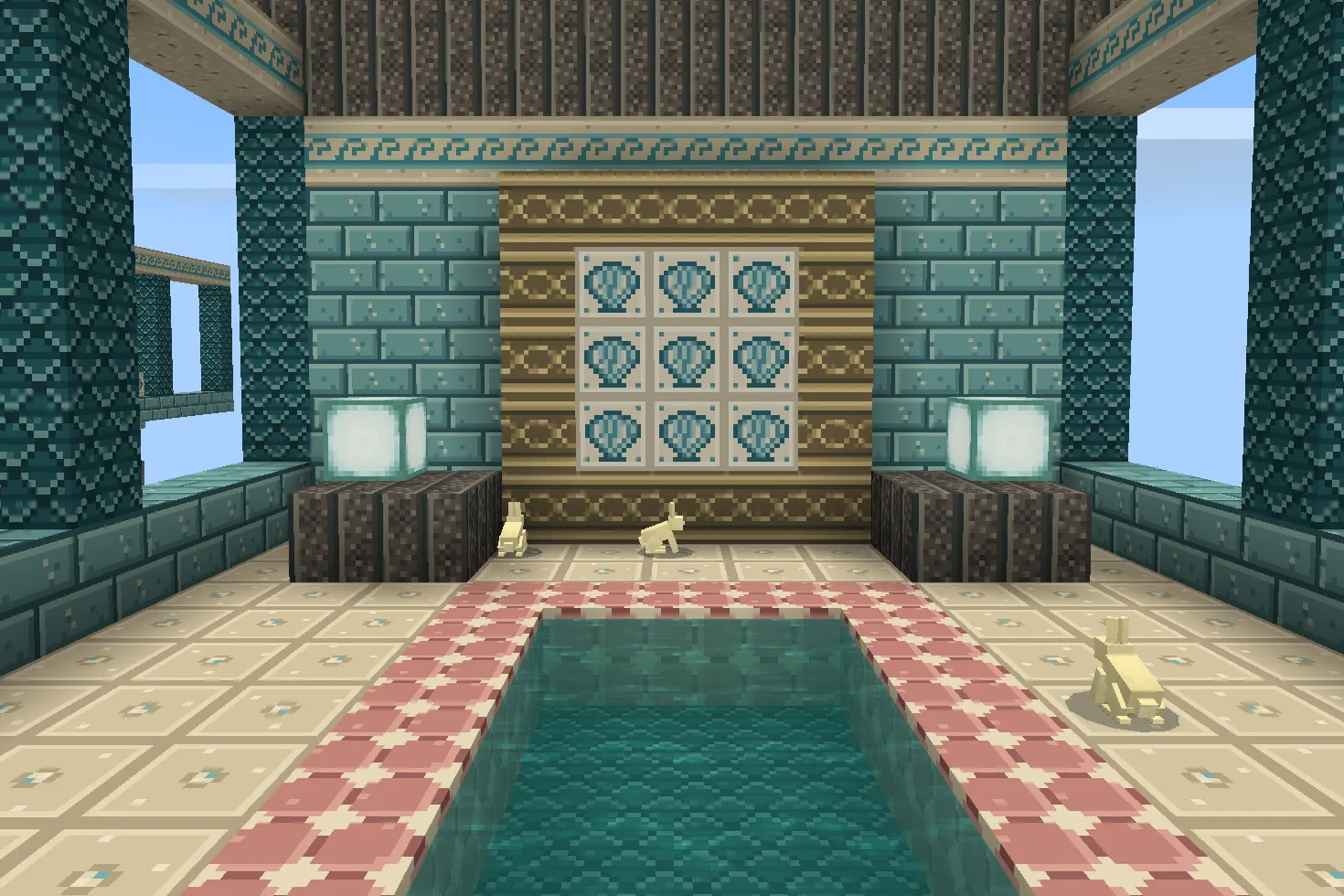
A build using this pack inside Minecraft on a phone, photographed when we checked it. The download includes the textures; the build is an example.
What changes
Build your own sea-palace palette with ten original 16×16 texture files. Prismarine bricks become pale turquoise ashlar and dark prismarine becomes deep teal scale mosaic. Sandstone has an ivory-and-turquoise wave border, pearl-inset paving on top and porous sand grain underneath; smooth sandstone shares the paving. White concrete bears a scallop-shell ceramic motif, pink concrete has coral-coloured diamond tiles, yellow concrete carries antique gold braid, dark oak planks become salt-grey driftwood, and gravel gains small shell chips. Shared stairs and slabs use these files too. Rough prismarine, sea lanterns, water, glass and living coral retain their existing textures. Shells, pearls and gold are painted detail, not items or light sources. No structure, furniture, water effect or gameplay change is included.
Prismarine bricks
Every prismarine bricks block in your world takes this look.
Dark prismarine
Every dark prismarine block in your world takes this look.
Sandstone sides
Every sandstone sides block in your world takes this look.
Sandstone tops and smooth sandstone
Every sandstone tops and smooth sandstone block in your world takes this look.
Sandstone undersides
Every sandstone undersides block in your world takes this look.
White concrete
Every white concrete block in your world takes this look.
Pink concrete
Every pink concrete block in your world takes this look.
Yellow concrete
Every yellow concrete block in your world takes this look.
Dark oak planks
Every dark oak planks block in your world takes this look.
Gravel
Every gravel block in your world takes this look.
How to install
- Open the .mcpack file with Minecraft Bedrock to import it.
- Edit a world, open Resource Packs, find this pack under My Packs and activate it.
- Place it above other packs that replace the same textures.
- Combine prismarine bricks and dark prismarine for pale masonry and deep teal scale tiles; their stairs and slabs change too.
- Use sandstone for wave borders and smooth sandstone for pearl-inset paving. Sandstone tops and undersides have their own matching textures.
- White concrete provides scallop ceramic, pink concrete provides coral-coloured tile and yellow concrete provides painted gold braid.
- Use dark oak planks for driftwood and gravel for shell-speckled paths. The shell chips are flat decoration.
- Build your own palace with existing blocks. Water, glass, rough prismarine, sea lanterns and living coral stay unchanged.
To use it in every world instead of one, go to Settings, then Global Resources, then My Packs, and activate it there.
If your browser saved the file ending in .zip, rename it to end in .mcpack before opening it.
Step-by-step install for your deviceChecked in the game
We put this exact file into Minecraft 1.26.45 on an Android phone on 8 September 2026, turned it on, and looked at every block it changes in a world. The pictures above are from that check.
Other devices and newer versions of Minecraft have not been checked yet.
File details
Pack version 0.1.0. Needs Minecraft 1.21.120 or newer.
SHA-256 d3a413144e9424728c9e6b3ed7340fd82299d9d5c4c4d9578cf71ad0a06465c0
You might also like
Texture pack
Aurelia Arcade
Nine Art Deco materials: ivory fluting, jade fans, gold chevrons, terrazzo, rose stone, ceramic diamonds, brass and two timbers.
Texture pack
Bracken Archive
Ten library textures: leather-bound book spines, walnut panels, chevron parquet, garnet runners, green leather and brass trim.
Texture pack
Petalwick Patisserie
Eight pastel shop textures: blush glaze, mint scallops, cream terrazzo, butter panels, pale parquet, rose brick, gingham and enamel.
Texture pack
Saffron Oasis
Nine desert-building textures with pale carved sandstone, turquoise mosaic floors, warm adobe and dark timber.