Texture pack for Minecraft Bedrock
Larkspur Conservatory
Three floral glass designs with matching pane edges, plus botanical ceramic, terracotta flooring, honey timber and ivory metal.
Free. 5 kB.
Changes 10 blocks. Works with Minecraft Bedrock 1.21 and newer. No experimental features.
In the game
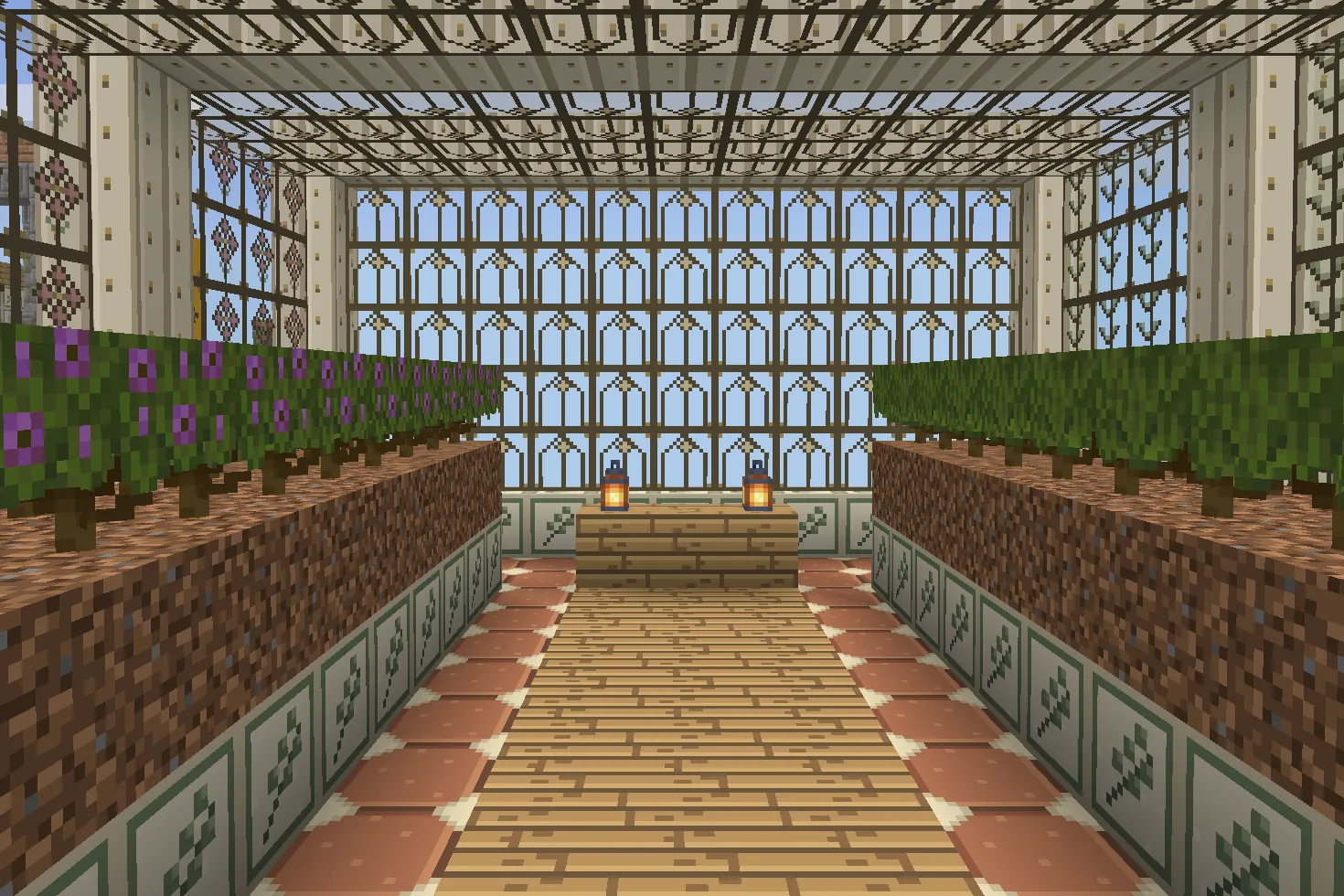
A build using this pack inside Minecraft on a phone, photographed when we checked it. The download includes the textures; the build is an example.
What changes
Make your own botanical glasshouse with three original 16×16 stained-glass designs: sage leaves on green glass, a rose flower on pink glass, and an amber arch on white glass. Translucent backgrounds let you see through the glass; bronze lines and coloured ornaments repeat on each block and pane. Matching edge files finish the three pane colours. Four opaque materials complete the palette: white concrete carries a ceramic leaf sprig, bricks become terracotta floor tiles, birch planks become honey timber and iron blocks gain ivory ribs with brass rivets. Ten texture files are supplied. Other glass colours and clear glass retain their existing appearance. Shared brick and birch stairs and slabs change too. Flowers, leaves, metal ribs and tile detail are painted pixels. No plants, structure, furniture, coloured light or gameplay changes are included.
White concrete
Every white concrete block in your world takes this look.
Bricks
Every bricks block in your world takes this look.
Birch planks
Every birch planks block in your world takes this look.
Block of iron
Every block of iron block in your world takes this look.
Green stained glass
Every green stained glass block in your world takes this look.
Green glass pane edges
Every green glass pane edges block in your world takes this look.
Pink stained glass
Every pink stained glass block in your world takes this look.
Pink glass pane edges
Every pink glass pane edges block in your world takes this look.
White stained glass
Every white stained glass block in your world takes this look.
White glass pane edges
Every white glass pane edges block in your world takes this look.
How to install
- Open the .mcpack file with Minecraft Bedrock to import it.
- Edit a world, open Resource Packs, find this pack under My Packs and activate it.
- Place it above other packs that replace the same textures.
- Use green, pink and white stained-glass blocks or panes for leaf, flower and arch patterns. Each design repeats per block; pane edges match.
- Place white concrete for botanical ceramic and bricks for terracotta flooring. These are opaque surfaces.
- Build frames with ivory iron blocks and use birch planks for honey-coloured timber; shared brick and birch stairs and slabs use the same files.
- Other stained-glass colours and clear glass keep their existing textures. Glass tint does not cast coloured light.
- Build your own conservatory and add vanilla plants if desired. The download supplies textures only, with no structure or new plants.
To use it in every world instead of one, go to Settings, then Global Resources, then My Packs, and activate it there.
If your browser saved the file ending in .zip, rename it to end in .mcpack before opening it.
Step-by-step install for your deviceChecked in the game
We put this exact file into Minecraft 1.26.45 on an Android phone on 8 September 2026, turned it on, and looked at every block it changes in a world. The pictures above are from that check.
Other devices and newer versions of Minecraft have not been checked yet.
File details
Pack version 0.1.0. Needs Minecraft 1.21.120 or newer.
SHA-256 ccdf77b388d09e8bb67b2282ff29c41f126928b4d1da7e8b34010119bcffc4f0
You might also like
Texture pack
Petalwick Patisserie
Eight pastel shop textures: blush glaze, mint scallops, cream terrazzo, butter panels, pale parquet, rose brick, gingham and enamel.
Texture pack
Aurelia Arcade
Nine Art Deco materials: ivory fluting, jade fans, gold chevrons, terrazzo, rose stone, ceramic diamonds, brass and two timbers.
Texture pack
Bracken Archive
Ten library textures: leather-bound book spines, walnut panels, chevron parquet, garnet runners, green leather and brass trim.
Texture pack
Meridian Relay
Ten sci-fi building textures: ivory hulls, braced decks, vents, caution stripes, silver hatches, conduits and telemetry panels.