Texture pack for Minecraft Bedrock
Vesper Hall
Nine gothic building textures: charcoal masonry, carved blackstone, plum shingles, oxblood brick, pale flags and ornate panels.
Free. 5 kB.
Changes 9 blocks. Works with Minecraft Bedrock 1.21 and newer. No experimental features.
In the game
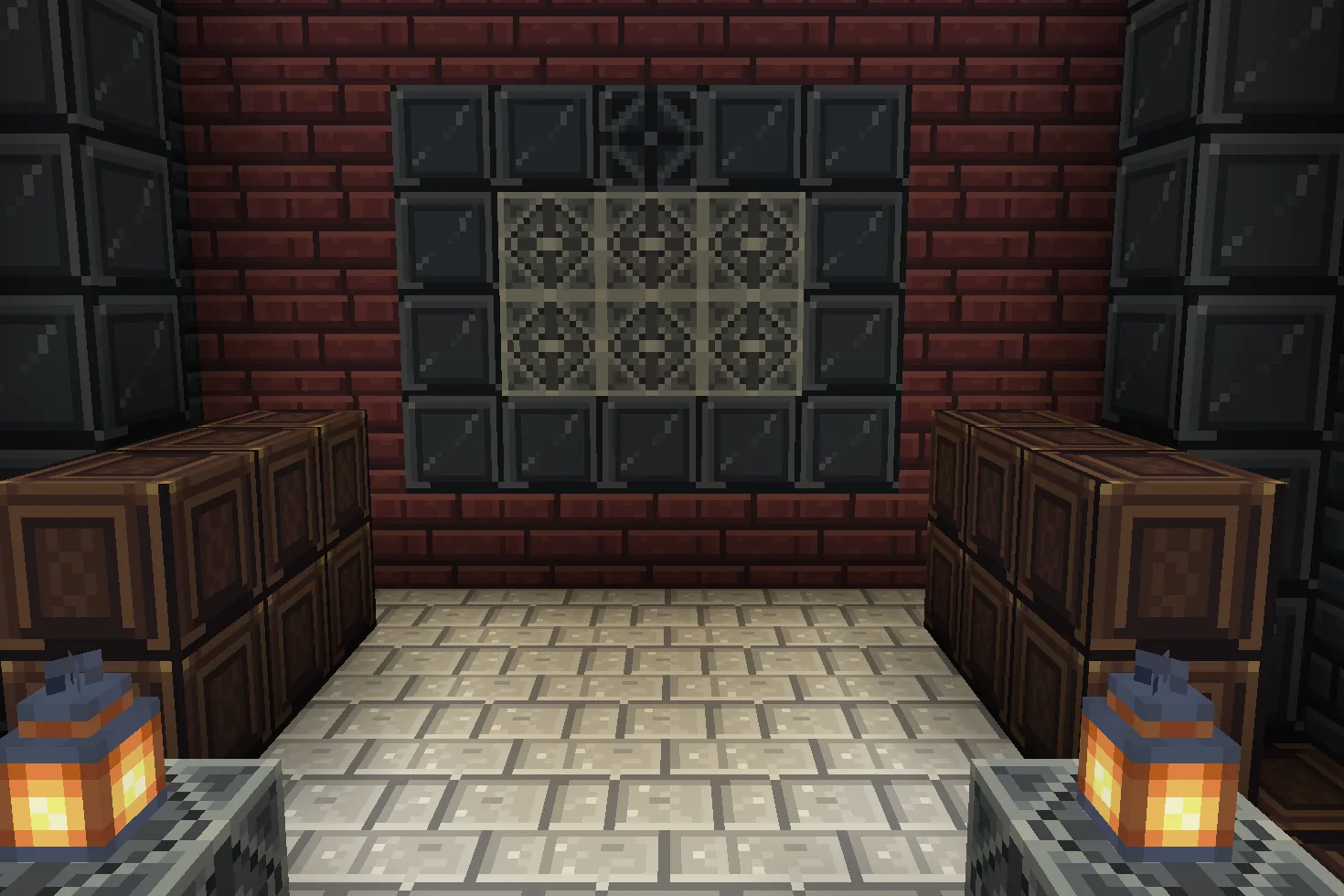
A build using this pack inside Minecraft on a phone, photographed when we checked it. The download includes the textures; the build is an example.
What changes
Build a gothic hall with readable dark masonry and carefully placed pale accents. Polished blackstone becomes beveled charcoal panels, its bricks gain narrow weathered joints, its cracked bricks keep deliberate fractures, and chiseled polished blackstone carries a four-lobed carving. Nether bricks become plum roof shingles and red nether bricks become oxblood masonry. Stone turns into pale limestone flagstones, dark oak planks into espresso coffers, and iron blocks into opaque pewter ornament. Nine original 16×16 tiles replace existing texture files throughout the world, including blocks that share those files. Bevels, carvings and filigree are painted details. No buildings, furniture, lighting effects or gameplay changes are included. Other textures keep their existing appearance.
Polished blackstone
Every polished blackstone block in your world takes this look.
Polished blackstone bricks
Every polished blackstone bricks block in your world takes this look.
Cracked polished blackstone bricks
Every cracked polished blackstone bricks block in your world takes this look.
Chiseled polished blackstone
Every chiseled polished blackstone block in your world takes this look.
Nether bricks
Every nether bricks block in your world takes this look.
Red nether bricks
Every red nether bricks block in your world takes this look.
Stone
Every stone block in your world takes this look.
Dark oak planks
Every dark oak planks block in your world takes this look.
Block of iron
Every block of iron block in your world takes this look.
How to install
- Open the .mcpack file with Minecraft Bedrock to import it.
- Edit a world, open Resource Packs, find this pack under My Packs and activate it.
- Place it above other packs that replace the same textures.
- Build walls with polished blackstone bricks; mix in cracked polished blackstone bricks for wear.
- Use polished blackstone as a dark frame and chiseled polished blackstone for carved trim.
- Use nether bricks for plum shingles and red nether bricks for oxblood accent walls.
- Lay stone as pale flagstones; stone also changes underground. Dark oak planks become coffer panels and iron blocks become opaque pewter ornament.
- These are painted textures on existing blocks, including shared-file variants. No structures are included.
To use it in every world instead of one, go to Settings, then Global Resources, then My Packs, and activate it there.
If your browser saved the file ending in .zip, rename it to end in .mcpack before opening it.
Step-by-step install for your deviceChecked in the game
We put this exact file into Minecraft 1.26.45 on an Android phone on 8 September 2026, turned it on, and looked at every block it changes in a world. The pictures above are from that check.
Other devices and newer versions of Minecraft have not been checked yet.
File details
Pack version 0.1.0. Needs Minecraft 1.21.120 or newer.
SHA-256 c91c3b91637ce052c3412e73b2e4990a4c6aefcda1667f886778bd91b744f935
You might also like
Texture pack
Meridian Relay
Ten sci-fi building textures: ivory hulls, braced decks, vents, caution stripes, silver hatches, conduits and telemetry panels.
Texture pack
Bracken Archive
Ten library textures: leather-bound book spines, walnut panels, chevron parquet, garnet runners, green leather and brass trim.
Texture pack
Frostmere Lodge
Ten alpine cabin textures: spruce bark and rings, warm boards, split stone, hearth masonry, quiet snow, woven wool and cast iron.
Texture pack
Aurelia Arcade
Nine Art Deco materials: ivory fluting, jade fans, gold chevrons, terrazzo, rose stone, ceramic diamonds, brass and two timbers.