Army Soldier
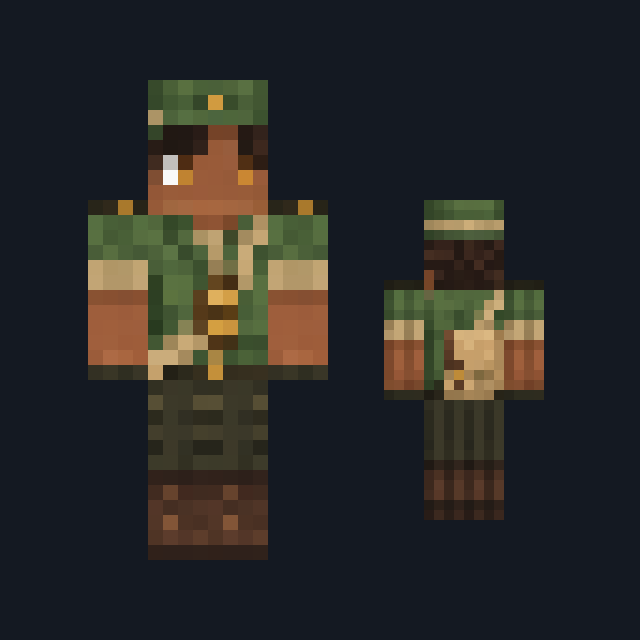
Soldier in an olive-drab field uniform with a soft field cap, crossed khaki webbing, two buttoned chest pockets, cargo trousers and tall black boots.
Soldier skin in an olive field uniform with webbing and boots
FreeSkin in Adventure
.mcpack file, 13 KB. Consoles and Java Edition can’t import packs.
Soldier in an olive-drab field uniform with a soft field cap, crossed khaki webbing, two buttoned chest pockets, cargo trousers and tall black boots.
Classic arms are four pixels wide, like Steve’s; slim arms are three, like Alex’s. Pick whichever fits the outfit in the Dressing Room.
Army Soldier wears a soft olive-drab field cap over a dark brown fringe, with bold blue eyes on the front of the face. An olive-drab field jacket covers the chest and back, marked on the front with two buttoned pockets and crossed khaki webbing straps, rolled khaki cuffs finish both forearms, and olive-drab cargo trousers tuck into tall black leather boots. It suits military roleplay, base builds and team servers. This free Minecraft Bedrock .mcpack holds one outfit in classic and slim arm fits. The skin changes how you look and nothing else: the webbing carries nothing you can open, the uniform adds no armor points, and it does not hide you from mobs.
0.1.0
First release
Minecraft Bedrock shows its version number in the bottom-right corner of the main menu. Everything on ModChest is built for Bedrock 1.26.45 and newer, on Android, iPhone, iPad and Windows. If your number is lower, update Minecraft from the store you installed it from, then import the skin.
Where the file lands, how to open it with Minecraft, and what to do if the import fails.

Skin


Skin

Skin pack

Skin
New skin pack
The ModChest app for Android, iPhone and iPad keeps a list of everything it sends to Minecraft, and shows when one has an update. About the app
