Candlewick Wraith
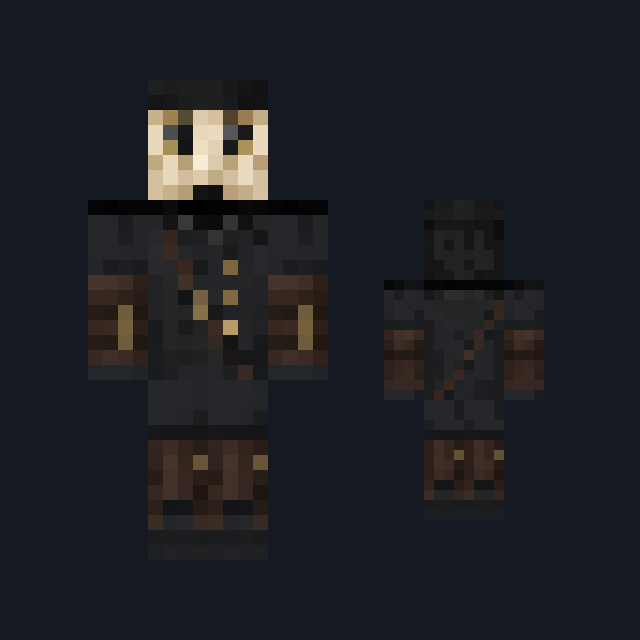
Wax-cream shroud with cooled drip edges, a pewter collar clasp and hollow dark eye sockets.
Three original spooky outfits with classic and slim arm fits
Free3 outfitsSkin pack in Horror & spooky and Fantasy
In the Halloween collection
.mcpack file, 30 KB. Consoles and Java Edition can’t import packs.
Wax-cream shroud with cooled drip edges, a pewter collar clasp and hollow dark eye sockets.
Grey-brown hood and cloak with a cream moth-wing band, eyespot marks and amber hood eyes.
Weathered slate body with creeping moss, carved grooves and bone-white grave flowers.
Classic arms are four pixels wide, like Steve’s; slim arms are three, like Alex’s. Pick whichever fits the outfit in the Dressing Room.
Halloween Crew is a single download holding three original spooky outfits with one quiet, unsettling mood. Candlewick Wraith is layered wax-cream shroud cloth with cooled drip edges, a dull pewter collar clasp and two hollow dark eye sockets on the front of the head. Moth Shroud is a heavy grey-brown hood and cloak carrying a cream moth-wing band with dark eyespot marks, pale antenna marks across the crown and two small amber eyes set back in the hood. Gravebloom Warden is a weathered slate figure with carved grooves, moss creeping up from the base, pale green glyph eyes and bone-white grave flowers at the crown and shoulder. Every outfit is painted on the standard player shape: there are no wings, no extra geometry, no glow and no ability of any kind. Each comes in classic and slim arm fits, so the download holds six skins.
0.2.0
Updated
0.1.0
First release
Minecraft Bedrock shows its version number in the bottom-right corner of the main menu. Everything on ModChest is built for Bedrock 1.26.45 and newer, on Android, iPhone, iPad and Windows. If your number is lower, update Minecraft from the store you installed it from, then import the skin pack.
Where the file lands, how to open it with Minecraft, and what to do if the import fails.
Spooky creations for the season, with more every year. Each has its own download.

Skin
Skin

Skin

Skin

Skin

Skin
Skin pack

Skin
The ModChest app for Android, iPhone and iPad keeps a list of everything it sends to Minecraft, and shows when one has an update. About the app