Ember Dragon
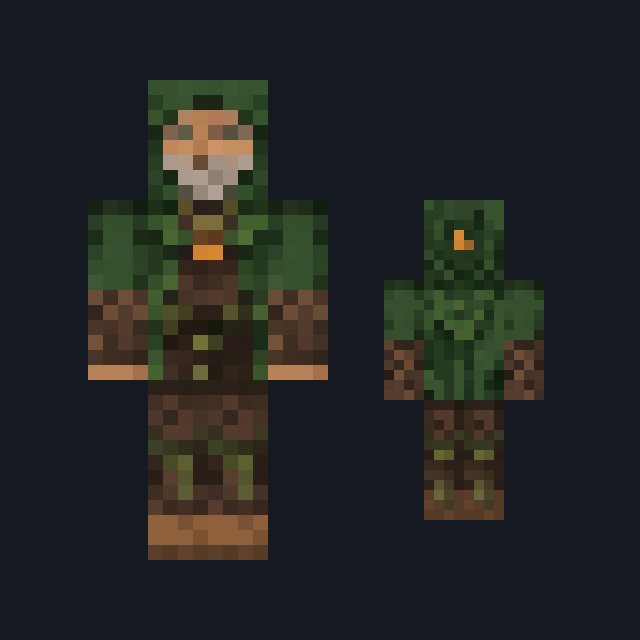
Charcoal scales, amber eyes, rust-orange face, segmented belly and dark boots.
Dragon costume skin with charcoal scales and amber markings
FreeSkin in Fantasy
.mcpack file, 14 KB. Consoles and Java Edition can’t import packs.
Charcoal scales, amber eyes, rust-orange face, segmented belly and dark boots.
Classic arms are four pixels wide, like Steve’s; slim arms are three, like Alex’s. Pick whichever fits the outfit in the Dressing Room.
Ember Dragon uses charcoal scales, rust-orange facial plates and an amber segmented belly to suggest a volcanic creature. Warm knee and cuff details connect the dark limbs to the torso for a dragon costume that fits fortress builds and fantasy roleplay. This free Minecraft Bedrock .mcpack includes one original outfit in classic and slim arm fits. Horn and claw details are painted; there are no wings, tail, flight or fire abilities.
0.1.0
First release
Minecraft Bedrock shows its version number in the bottom-right corner of the main menu. Everything on ModChest is built for Bedrock 1.26.45 and newer, on Android, iPhone, iPad and Windows. If your number is lower, update Minecraft from the store you installed it from, then import the skin.
Where the file lands, how to open it with Minecraft, and what to do if the import fails.
New skin pack

New skin pack
Skin

Skin

Skin

Skin

Skin

Skin
The ModChest app for Android, iPhone and iPad keeps a list of everything it sends to Minecraft, and shows when one has an update. About the app
