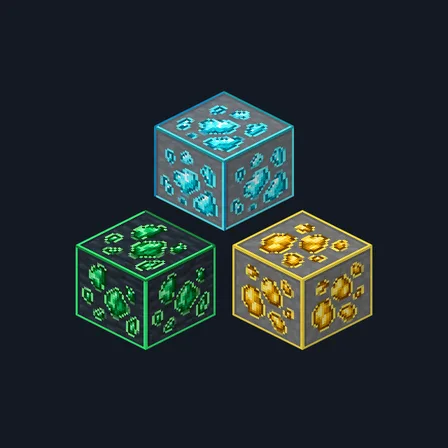
Framed Ores
Texture pack
Cartoon ore nuggets with bold outlines in stone and deepslate
Free16 texturesTexture pack in Simple & cartoon
.mcpack file, 33 KB. Consoles and Java Edition can’t import packs.
Cartoon Ores draws every deposit the way a picture book would: a few big rounded nuggets, each with a bold dark outline and two flat tones inside, sitting in a plain unspeckled stone field. Coal is charcoal black, iron pale peach, copper orange, gold warm yellow, redstone scarlet, lapis deep blue, diamond icy cyan and emerald grass green. Every mineral uses its own count and arrangement of nuggets, so the eight are told apart at a glance rather than by colour alone, and all eight appear twice: once on flat mid-grey stone and once on flat dark deepslate. It is the simplest of our three ore packs, meant for builds that want ores readable rather than realistic. Surface artwork only: no glow, no X-ray, and no change to drops or mining behavior.
0.2.0
Updated
0.1.0
First release
Minecraft Bedrock shows its version number in the bottom-right corner of the main menu. Everything on ModChest is built for Bedrock 1.26.45 and newer, on Android, iPhone, iPad and Windows. If your number is lower, update Minecraft from the store you installed it from, then import the texture pack.
Where the file lands, how to open it with Minecraft, and what to do if the import fails.
Texture pack
Texture pack
New texture pack
Texture pack
Texture pack
Texture pack
The ModChest app for Android, iPhone and iPad keeps a list of everything it sends to Minecraft, and shows when one has an update. About the app