
Skip to content
Search in
backpack
furniture
ores
tools
animals
medieval
knight

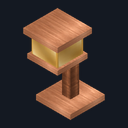
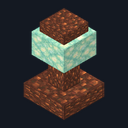
Amber Floor Lamp

  • Drag to turn
  • ← → to turn
  • R to reset

Sculpted Lamps

Light homes, walls and paths with 12 matching lamps and 8 dimmers

Premium12 blocksBlock mod in Building & decor and Furniture

In Premium in the ModChest app

It comes with Premium, the subscription in the ModChest app.

Works with Minecraft Bedrock 1.26.45 and newer

  • Android
  • iPhone and iPad
  • Windows

Consoles and Java Edition can’t import packs.

Every ModChest mod is checked against the others, so no two use the same block, item or creature.

What’s inside

  • Amber Floor Lamp
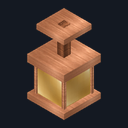
  • Amber Hanging Lantern
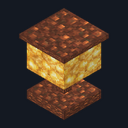
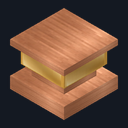
  • Amber Table Lamp
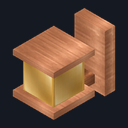
  • Amber Wall Sconce
  • Copper Beacon Post
  • Copper Path Light
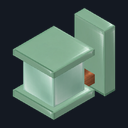
  • Mint Path Bollard
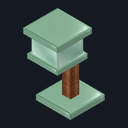
  • Mint Floor Lamp
Show all 12 blocks
  • Mint Wall Sconce
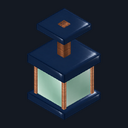
  • Navy Hanging Lantern
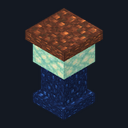
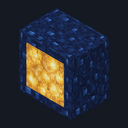
  • Navy Lightbox
  • Navy Path Light
Mod version
1.3.0
Updated
October 2026

What it does

Craft an Amber Table Lamp, Mint Path Bollard, Navy Lightbox or Copper Beacon Post from glowstone dust and everyday materials. Place these four original lamps to start at light level 15, then use them while standing to switch off or on.

Read more

Turn a table lamp or bollard into an amber or mint wall sconce with an iron ingot, or a floor lamp with a stick. Add string to a table lamp or lightbox for an amber or navy hanging lantern. Add stone to a beacon post or lightbox for a copper or navy path light. Sconces attach to the side of a block and face away from the wall; lanterns hang beneath a block; floor lamps and path lights stand on top of a block. Floor lamps face you when placed.

Each of the eight new designs starts at full brightness. Use one while standing to cycle through light levels 15, 10, 5 and off, then back to 15. Every lamp keeps its setting when you save and reload. Break a lamp to pick it up and move it; placing it again starts at full brightness. Crouch to place a block against a lamp without changing its light.

Minecraft light has no color, so the lamp colors change their appearance rather than the color of the light, and the Copper Beacon Post gives no beacon effects.

  • 12 matching lamp designs using amber, mint, navy and copper materials
  • 8 dimmable additions: 2 wall sconces, 2 hanging lanterns, 2 floor lamps and 2 path lights
  • 4 light settings for each new lamp: 15, 10, 5 and off
  • 4 original lamps with their familiar full-brightness on/off switch
  • 12 lamps that keep their light setting after you save and reload
  • 1 lamp returned when you break any design

How to install Sculpted Lamps

  1. Import the .mcaddon, then turn on both packs in your world settings (Behavior Packs and Resource Packs).
  2. At a crafting table, combine 2 copper ingots, 1 glowstone dust and 1 glass for an Amber Table Lamp; 2 prismarine shards, 1 glowstone dust, 1 glass and 1 copper ingot for a Mint Path Bollard; 2 blue terracotta, 2 glowstone dust and 1 glass for a Navy Lightbox; or 3 copper ingots, 2 glowstone dust and 1 amethyst shard for a Copper Beacon Post.
  3. For a wall sconce, combine 1 Amber Table Lamp or Mint Path Bollard with 1 iron ingot; for a floor lamp, combine either with 1 stick. For a hanging lantern, combine 1 Amber Table Lamp or Navy Lightbox with 1 string. For a path light, combine 1 Copper Beacon Post or Navy Lightbox with 1 stone. Each recipe makes 1 lamp.
  4. Place a sconce on a block side, a lantern on a block underside, or a floor lamp or path light on a block top. Each starts at light level 15.
  5. Use a lamp while standing (right-click on Windows, tap on touch screens). The original four switch off and on; the new eight cycle from 15 to 10 to 5 to off and back to 15.
  6. Crouch to place blocks against a lamp without adjusting it. Break a lamp to pick it up; when placed again it starts at full brightness.
How to craft all 12 pieces
  • Amber Floor Lamp

    Crafting table, in any arrangement

    • Amber Table Lamp, 1
    • Stick, 1
  • Amber Hanging Lantern

    Crafting table, in any arrangement

    • Amber Table Lamp, 1
    • String, 1
  • Amber Table Lamp

    Crafting table, in any arrangement

    • Copper ingot, 2
    • Glowstone dust, 1
    • Glass, 1
  • Amber Wall Sconce

    Crafting table, in any arrangement

    • Amber Table Lamp, 1
    • Iron ingot, 1
  • Copper Beacon Post

    Crafting table, in any arrangement

    • Copper ingot, 3
    • Glowstone dust, 2
    • Amethyst shard, 1
  • Copper Path Light

    Crafting table, in any arrangement

    • Copper Beacon Post, 1
    • Stone, 1
  • Mint Path Bollard

    Crafting table, in any arrangement

    • Prismarine shard, 2
    • Glowstone dust, 1
    • Glass, 1
    • Copper ingot, 1
  • Mint Floor Lamp

    Crafting table, in any arrangement

    • Mint Path Bollard, 1
    • Stick, 1
  • Mint Wall Sconce

    Crafting table, in any arrangement

    • Mint Path Bollard, 1
    • Iron ingot, 1
  • Navy Hanging Lantern

    Crafting table, in any arrangement

    • Navy Lightbox, 1
    • String, 1
  • Navy Lightbox

    Crafting table, in any arrangement

    • Blue terracotta, 2
    • Glowstone dust, 2
    • Glass, 1
  • Navy Path Light

    Crafting table, in any arrangement

    • Navy Lightbox, 1
    • Stone, 1
What changed
  1. 1.3.0

    Added eight matching sconces, hanging lanterns, floor lamps and path lights with two dimmer steps and off.

  2. 1.2.0

    Updated

  3. 1.0.0

    First release

Which version do I have?

Minecraft Bedrock shows its version number in the bottom-right corner of the main menu. Everything on ModChest is built for Bedrock 1.26.45 and newer, on Android, iPhone, iPad and Windows. If your number is lower, update Minecraft from the store you installed it from, then import the mod.

Step-by-step for your device

Where the file lands, how to open it with Minecraft, and what to do if the import fails.

The ModChest app for Android, iPhone and iPad keeps a list of everything it sends to Minecraft, and shows when one has an update. Get the app